Printify
DJ Portrait Ergonomic Mouse Pad With Memory Foam Wrist Rest And Removable Neoprene Insert Moody Music Vibes
DJ Portrait Ergonomic Mouse Pad With Memory Foam Wrist Rest And Removable Neoprene Insert Moody Music Vibes
Couldn't load pickup availability
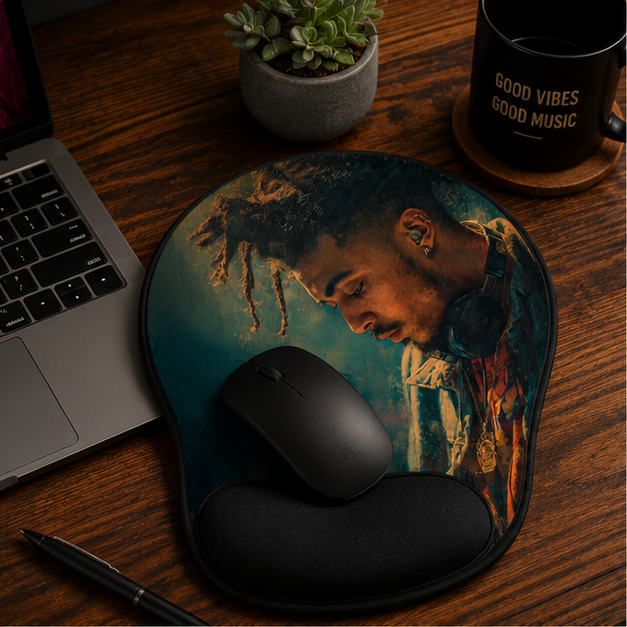
Introducing the DJ Portrait Ergonomic Mouse Pad with Wrist Rest — Moody Music Vibes, a desk companion that blends striking art with everyday comfort. The glossy, moody portrait brings personality to your workstation, while the ergonomic design supports your wrist through long editing marathons, late-night mixes, and marathon streaming sessions.
- Removable neoprene insert for effortless cleaning—spot-clean without disturbing the printed surface.
- Vivid, high-resolution sublimation print delivers bold colors and sharp detail that stay true even after hours of use.
- Ergonomic Memory Foam wrist support cushions and cradles the wrist, helping reduce fatigue during prolonged computer work.
- Semi-opaque black plastic base with a recessed fit holds the insert securely, ensuring the design lies perfectly flat for smooth mouse tracking.
- Compact, desk-friendly size at 9.17" x 10.15" (25.8 x 23.3 cm) fits neatly into tight setups without sacrificing workspace.
This pad isn’t just a pretty face on your desktop. It’s built for real-life use—whether you’re cutting tracks, editing video, or simming through design software. The Moody Music Vibes artwork is a quiet anchor for your creative flow, while the memory foam wrist rest reduces strain during precise, long-form tasks. If you’ve considered hard mouse mats or non-ergonomic pads, this hybrid solution offers both style and support in one elevated package.
Who is this ideal for? Home studio creators, DJs, music producers, video editors, and anyone who spends hours at the computer and wants a desk that respects their posture without compromising on aesthetics.
Practical tips for best results:
- Position the pad so the portrait faces you when you’re seated, creating a visually pleasing focal point at eye level.
- Keep the neoprene insert clean by removing it and washing occasionally; spot-clean the surface as needed.
- Pair with a comfortable mouse and keyboard setup to maximize ergonomic benefits during long sessions.
Care and maintenance: Clean spots with warm water and a small amount of dish soap. Do not soak the entire pad. For tougher spots, use a soft-bristled brush to lift debris without scratching the surface. With proper care, the vivid print and supple wrist support stay ready for your next session.
Share